
Every Outlook user is aware of the importance of the PST (Personal Storage Table) files. These files are compatible across all versions. Mailbox data administration and proper control fall under the purview of PST data files. Their portable nature makes them great for archiving of older emails. However, these data files (.pst) may become corrupted if improperly handled. A damaged PST file is catastrophic. It signals multiple problems. The scenario disturbs normal mailbox functioning. The users also witness a situation with complete Outlook crashes. PST corruption creates serious communication challenges.
We have explained PST corruption consequences. Now it’s time to discuss its solutions. Every Outlook user knows about ScanPST.exe. This built-in utility works well for minor corruption. Also known as the Inbox Repair Tool, this functionality runs multiple scans to fix header and structure issues in the data file. But sometimes ScanPST fails with complex errors. In such cases, users need alternatives. Fortunately, there are some free solutions available to fix corruption issues in a PST. A demo version of professional tools can be tried. There are also online PST repair service options to explore. Checkout our guide titled “How to Repair corrupt PST file to Restore Emails for Free” to know more.
What Causes PST File Corruption?
- An unstable Internet connection can lead to PST corruption
- If the Outlook application closes abruptly
- Third-party add-ins are also responsible for this issue
- An oversized data file size is the main culprit behind PST corruption
- Malware attacks can cause corruption as well
- Hard drives with bad sectors are also a major reason behind corruption
How to Repair a Damaged PST for Free?
Fixing the damaged data file (.pst) must be the top priority of each user. In this part of the guide titled “How to Repair corrupt PST file to Restore Emails for Free,” we will unearth certain freeways available to every user. Check the below guide:
Fix 1: Employing ScanPST.exe:
This utility tries to fix inconsistencies in the PST file structure. The step-by-step process description is listed below:
- Discover ScanPST.exe on the following locations:
| Version | Location |
| Office 365\2019\2016\ 2021\365: | C:\Program Files\Microsoft Office\root\Office16 or C:\Program Files (x86)\Microsoft Office\root\Office16 |
- Close all active applications
- Shutdown allied processes as well
- Provide some time to the app to settle
- After this Click Windows + R keys
- Browse the ‘Run’ dialogue box
- Type %programfiles%/Microsoft Office/ in it, then press Enter
- Hover the cursor on the targeted PST file
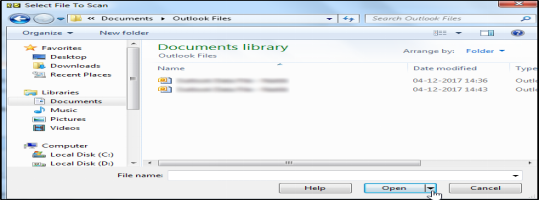
- Initiate the file scan
- A report with PST errors and inconsistencies will pop up
- Press the ‘Repair’ button to start the process
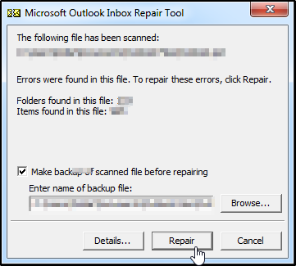
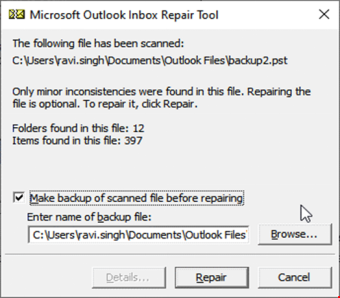
- Check box reading “Make Backup…..repairing” option
- Suggest the path where you want to save this backup file.
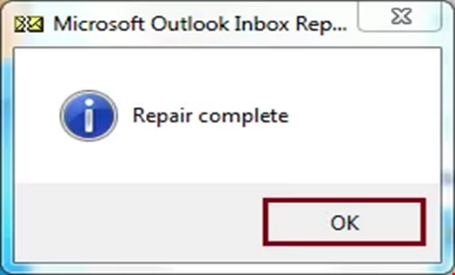
- After the completion of the repair process, check whether all email messages and other mailbox data are in order like before.
Limitations of ScanPST:
- ScanPST.exe can fix only minor to moderate levels of PST file corruption
- ScanPST fails completely when the corruption level is extremely severe
- The utility struggles with an oversized PST
- The functionality may remove corrupted mailbox items, leading to data loss
- It cannot recover permanently deleted emails effectively
- Multiple repair attempts are often required to fix a single PST file
- The tool provides limited recovery details and no preview of recoverable data
Method 2: Repair Using a Professional Tool (When Outlook Crashes & ScanPST Fails):
We have explored the limitations of ScanPST.exe. At the same time, we came to know that while trying to fix an oversized PST file, not only ScanPST fails but there are instances of Outlook crashes. At this stage, only a specialized software like Stellar Repair for Outlook will work. Such tools utilize advanced algorithms. They can recover even deleted or inaccessible mailbox items. However, the free version of this PST repair software only offers limited functionality. Additionally, the desktop version requires installation as well.
Method 3: Utilizing an Online PST Repair Solution:
This method offers clear advantages over the traditional desktop version. First and foremost, it eliminates installation hassles. It means that a any user with an active internet can repair files directly through a browser. Secondly, online repair tools are not limited by local hardware constraints. Thirdly, platforms like Stellar Online PST Repair can repair damaged PST files to restore emails for free (up to 500 MB). Fourthly, online platforms reduce dependency on local system resources.
Why Stellar Online PST Repair?
- Free repair up to 500 MB
- Doesn’t require Outlook installation
- Offers preview of the folder structure
- Ensures full integrity of data files
- The process is faster, more reliable
- Ability to can handle oversized or severely corrupted PST files more efficiently
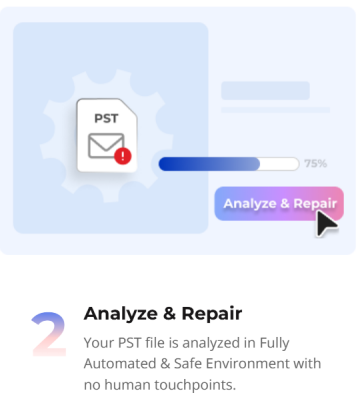
How Stellar Online PST Repair Works?


Conclusion:
The above guide was centred around “How to Repair corrupt PST file to Restore Emails for Free.” We came to know that when PST file is corrupted, the user experiences multiple issues. Not only are Outlook crashes frequent, but issues like inaccessible email messages and missing contacts are also common. ScanPST is the most frequently used utility to fix PST issues. But it has its limitations. There are circumstances when Scanpst fails to fix issues. It struggles to repair an oversized data file (.pst). It may fail to repair a severely-corrupted PST. Such a situation demands an advance tool. A user needs to utilize some advance PST Repair Tool. These tools employ superior algorithms. Again, these tools are divided in two categories. Desktop PST Repair Tool and Online PST Repair Tool. The latter is the best idea as it doesn’t require an installation. It can be accessed from any device with a browser, offering flexibility. Also, it reduces dependency on local system resources, minimizing crash risks.
READ MORE : 6 Tips For Making Braces Easier For Kids And Teens